

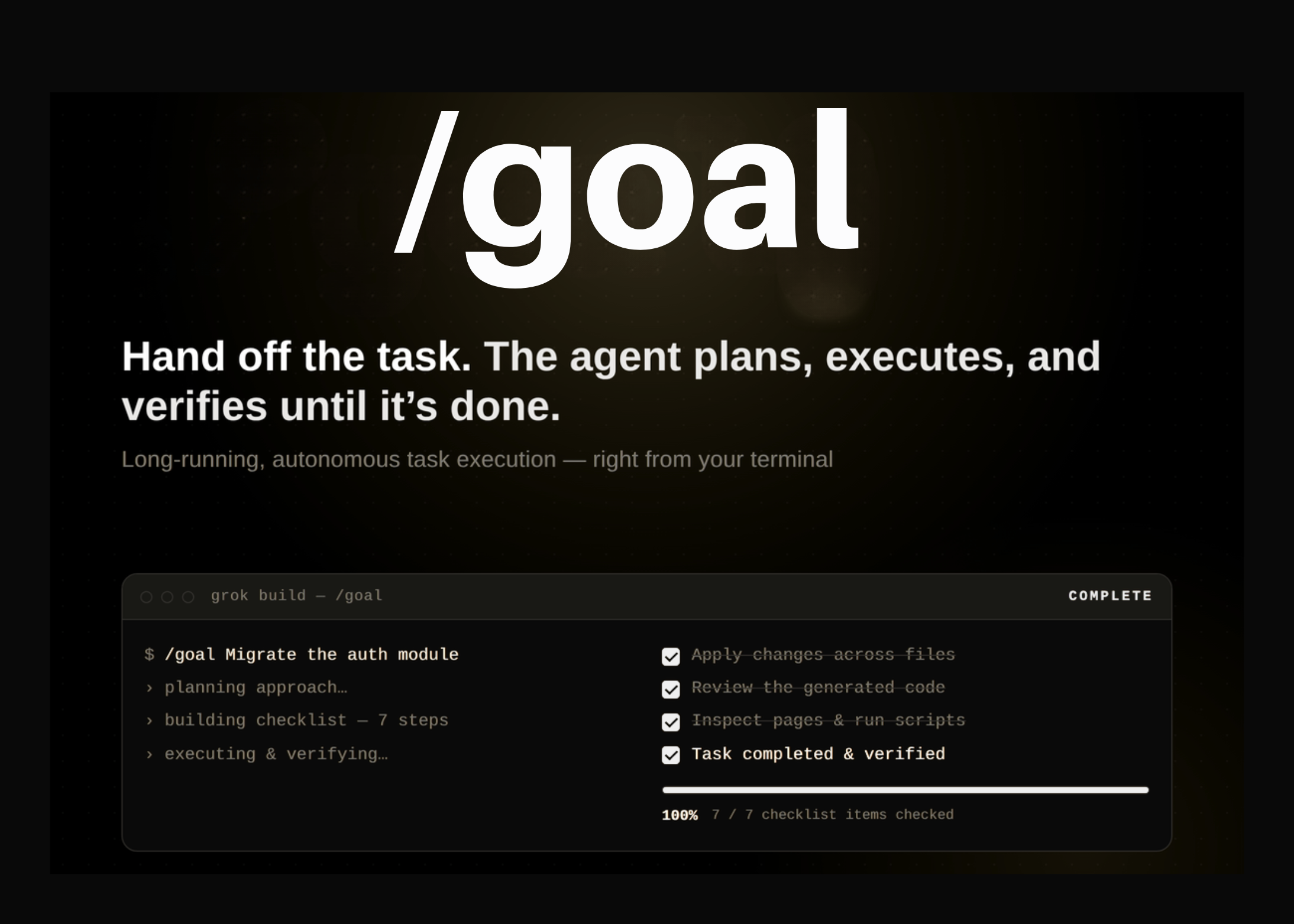

xAI shipped a new mode called /goal inside Grok Build, its terminal coding agent. The feature targets long-running, autonomous task execution. You hand the agent a larger implementation task, then step back.
Most coding sessions require back-and-forth execution and verification. You prompt, the agent acts, and you verify each step. /goal changes that loop. The agent keeps working until a task is completed and verified. Verification can mean reviewing code, inspecting webpages, or executing scripts.
The mode packages that autonomy behind one command and a visible progress checklist.
TL;DR
- /goal runs long, autonomous tasks inside Grok Build’s terminal agent.
- It plans an approach, builds a checklist, executes, and verifies until complete.
- Verification can review code, inspect webpages, or execute scripts.
- status, pause, resume, and clear steer the live run.
- Access needs a SuperGrok or X Premium Plus subscription.
What is /goal
/goal is a mode within Grok Build, not a separate product. Grok Build is xAI’s coding agent and CLI for software engineering. A CLI is a command-line tool that runs in your terminal. It works against your local codebase, reading files and running commands.

Grok Build already ships several agent features. It has a plan mode that blocks edits until you approve a plan. It delegates larger work to specialized subagents that run in parallel. It reads your AGENTS.md, plugins, hooks, skills, and MCP servers out of the box. MCP is a protocol that connects agents to external tools and data.
Access requires a SuperGrok or X Premium Plus subscription. You install the CLI with one command:
You then sign in with your account and invoke /goal. The mode is built for handoff. You describe one objective, and the agent owns the multi-step work.
Why Long-Running Execution Matters
An agent is given a goal, not just a single prompt. It plans steps, executes them, observes results, and replans when reality diverges. That is the observe–plan–act loop. The trade-off is observability: long runs produce many actions you must monitor. /goal answers that with a progress checklist and steering commands.
How /goal Works
You set a goal in a single line. You type it inside the Grok Build session, not your system shell. For example:
Grok Build plans an approach for that objective. It breaks the work into a progress checklist. It then starts executing the checklist items one by one.
You are not locked out during the run. You can keep sharing additional instructions as it works. When the goal is finished, the panel flips to Complete. Every checklist item then shows as checked.
The Verification Step
The detail worth noting is verification. /goal does not stop at writing code. It continues until the task is completed and verified.
Verification, per xAI, can take three forms. The agent may review the code it produced. It may inspect webpages to confirm behavior. It may execute scripts to test the result.
This matters for autonomous runs. An agent that only edits files may report success before the change works. Building verification into the run means the agent tests its own output before it finishes.
Interactive Demo
Use Cases With Examples
Module migration is the main example. /goal Migrate the auth module to the new API covers a multi-file change. The task is long, mechanical, and testable.
Other practical handoffs fit the same shape:
- Refactor a service, then run its test suite to confirm a green build.
- Add an endpoint, then inspect the rendered page for runtime errors.
- Upgrade a dependency, execute the build, and fix the breakages.
- Port a config across files, then run a script to validate it.
Each task suits an autonomous goal better than a quick one-line edit. The payoff comes when the work spans many steps you would otherwise supervise.
Steering a Long-Running Goal
/goal adds commands to monitor and steer the run. You type them inside the Grok Build session:
/goal pause # stop work, keep the goal
/goal resume # pick back up
/goal clear # drop the goal entirely
status surfaces the live progress panel. pause halts work but keeps the goal intact. resume continues from where it stopped. clear drops the goal entirely and starts fresh.
These controls are important for unattended runs. You can pause work or drop the goal at any point. That helps when an agent edits files and runs scripts on its own.
How /goal Compares
/goal sits among terminal coding agents that already run multi-step work. What it adds is an explicit, steerable goal object. The named lifecycle commands and the built-in verification step are the new parts.
Key Takeaways
- /goal runs long, autonomous tasks inside Grok Build’s terminal agent.
- It plans an approach, builds a checklist, executes, and verifies until complete.
- Verification can review code, inspect webpages, or execute scripts.
- status, pause, resume, and clear steer the live run.
- Access needs a SuperGrok or X Premium Plus subscription.
Check out the Technical details. Also, feel free to follow us on Twitter and don’t forget to join our 150k+ML SubReddit and Subscribe to our Newsletter. Wait! are you on telegram? now you can join us on telegram as well.
Need to partner with us for promoting your GitHub Repo OR Hugging Face Page OR Product Release OR Webinar etc.? Connect with us
Michal Sutter is a data science professional with a Master of Science in Data Science from the University of Padova. With a solid foundation in statistical analysis, machine learning, and data engineering, Michal excels at transforming complex datasets into actionable insights.